RD Sharma Class 10 Solutions
Publisher Description
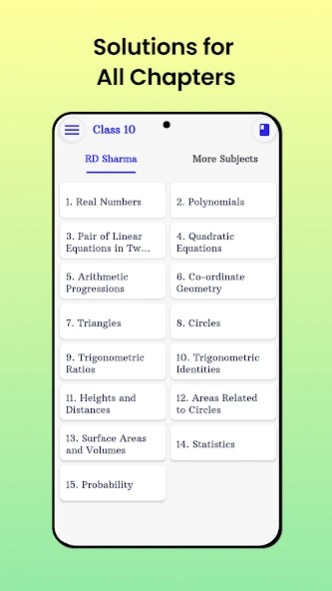


Get RD Sharma Class 10 Maths Solutions
In this app, you will get the solutions to all the questions in RD Sharma's Maths book.
List of Chapters in RD Sharma Maths Solutions:
Chapter 1 - Real Numbers
Chapter 2 - Polynomials
Chapter 3 - Pair of Linear Equations in Two Variables
Chapter 4 - Quadratic Equations
Chapter 5 - Arithmetic Progressions
Chapter 6 - Co-ordinate Geometry
Chapter 7 - Triangles
Chapter 8 - Circles
Chapter 9 - Constructions
Chapter 10 - Trigonometric Ratios
Chapter 11 - Trigonometric Identities
Chapter 12 - Heights and Distances
Chapter 13 - Areas Related to Circles
Chapter 14 - Surface Areas and Volumes
Chapter 15 - Statistics
Chapter 16 - Probability
About RD Sharma Class 10 Solutions
The company that develops RD Sharma Class 10 Solutions is CBSE Path. The latest version released by its developer is 1.0 .
To install RD Sharma Class 10 Solutions on your Android device, just click the green Continue To App button above to start the installation process. The app is listed on our website since 2026-08-29 and was downloaded 24 times. We have already checked if the download link is safe, however for your own protection we recommend that you scan the downloaded app with your antivirus. Your antivirus may detect the RD Sharma Class 10 Solutions as malware as malware if the download link to com.cbsepath.rdsharmaclass10mathssolution is broken.
How to install RD Sharma Class 10 Solutions on your Android device:
- Click on the Continue To App button on our website. This will redirect you to Google Play.
- Once the RD Sharma Class 10 Solutions is shown in the Google Play listing of your Android device, you can start its download and installation. Tap on the Install button located below the search bar and to the right of the app icon.
- A pop-up window with the permissions required by RD Sharma Class 10 Solutions will be shown. Click on Accept to continue the process.
- RD Sharma Class 10 Solutions will be downloaded onto your device, displaying a progress. Once the download completes, the installation will start and you'll get a notification after the installation is finished.
Program Details
System requirements
Download information
Pricing
Version History
version
posted on 2026-08-29
**Fix: in app update crash
version 24.08.25
posted on 2025-08-25
version
posted on 2025-08-25
**Fix: Status bar icon color bellow api 34
version 17.11.24
posted on 2025-02-04
** Updated content for 2024-2025
version 04.02.24
posted on 2025-02-04
* Updated screenshots
* Fixed a minor bug
version 18.08.24
posted on 2024-08-18
**Added new content
** Bugfixes and performance improvement
version 09.21.23
posted on 2024-08-18
**Removed other categories and classes.
version 07.29.23
posted on 2023-07-30
**Bug fixes, New Content
version 1.0.2
posted on 2022-03-26
Updated the content
